BAD-ASS-MCP · FREE & OPEN SOURCE
Your desktop app, tested on autopilot.
Show an AI your app once. It learns the clicks, and BAM replays them as a test whenever you like: no AI, no cost, and a clear pass/fail report with screenshots of every step. Mac, Windows, Linux, and even the Steam Deck.
pip install bad-ass-mcp · Like Playwright, but for desktop apps.
01Explore once. Replay forever.
The slow, expensive part (an AI figuring out your app) happens one time. Everything after that is a free, repeatable test.
An AI tries your app
Claude, Codex, Gemini or a model on your own machine clicks around, types, opens menus and checks that things worked, just like a careful tester.
Costs a little AI time. Once.
It writes down what worked
The path becomes a short script you can read: "click Insert emoji, type crab, press Enter, check the file saved". It lives next to your code.
Yours to keep and edit.
BAM runs it again, any time
Before every release, after every change, on every computer you have. You get a report that says what passed, what failed, and shows you the screen at each step.
Free. Every time.
02It reads apps the way a screen reader does
Every Mac, Windows and Linux app describes its buttons, menus and text boxes so blind and low-vision people can use it. bad-ass-mcp reads that same description. So it clicks "Save" because it knows which thing is the Save button, not because it guessed from the pixels.
Fast and cheap
Reading a list of buttons is instant. Sending a screenshot to an AI on every step is slow and costs money.
Doesn't break on a new look
Change the theme, the font or the window size and the test still finds "Save". Pixel-based tests fall over.
Good for accessibility, too
If BAM can't find a button by name, a screen reader user can't either. Your tests quietly check that.
Eyes only when it has to
Games and 3D views don't describe themselves. There, it falls back to looking at the screen, like the Among Us clip in the gallery.
For the techies: macOS AXUIElement, Windows UI Automation, Linux AT-SPI2. Vision fallback via screenshot, click_at and drag.
03A test anyone can read
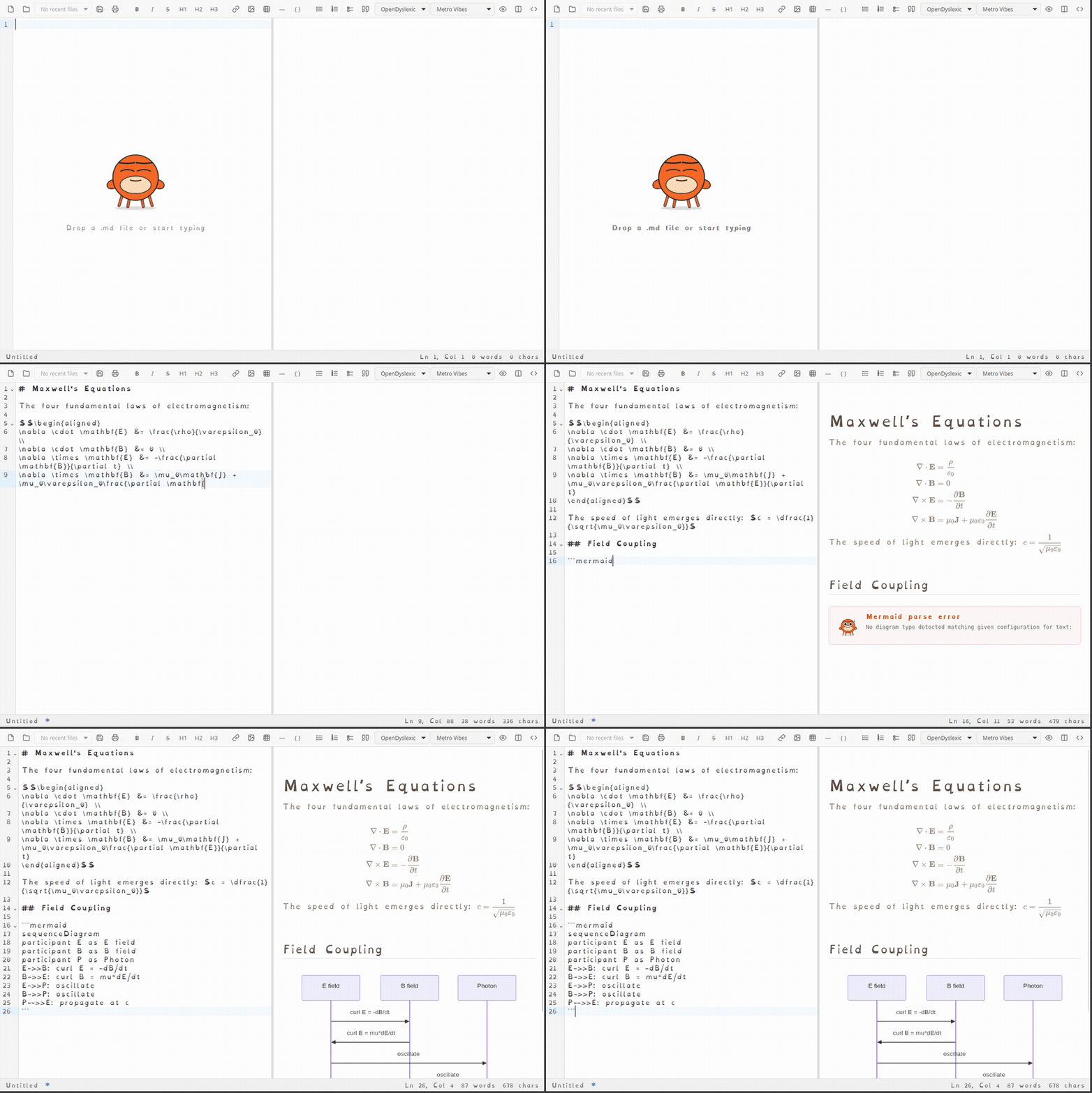
This one checks a Markdown editor's emoji picker: open it, search for "crab", press Enter. The same file runs on Windows and Linux.
// smoke/emoji-picker.json (trimmed)
{
  "name": "emoji-picker",
  "platforms": ["windows", "linux"],
  "phases": [
    {
      "learn": { "emoji": { "name": "Insert emoji" } },
      "steps": [
        { "action": "click", "target": "emoji" },
        { "action": "wait_for_element", "name": "Search emoji" }
      ]
    },
    {
      "learn": { "search": { "name": "Search emoji" } },
      "steps": [
        { "action": "type", "target": "search", "text": "crab" },
        { "action": "key", "key": "Return" }
      ]
    }
  ]
}
Typo in a script? bad-ass-mcp check catches it before anything runs: unknown key 'taget' (did you mean 'target'?)
04A report you'll actually read
Every step in plain words, ticked off or marked where it went wrong, with a screenshot after each part. Failures come first.
$ bad-ass-mcp run smoke/ --config bam.json
[██████████████████████████████] 100% done · 1 passed · 1 failed
PASS     font-picker-escape  (27.0s)
FAIL     b-deliberately-broken  (23.5s)
         element not found: done (name 'Done and dusted')

1 passed, 1 failed in 50.0s  ·  macos  ·  commit 79a8a8d
report: bam-results/…/report.html
Open a real report
From a real run on a Mac: one test passes, one was broken on purpose so you can see what a failure looks like. Click any screenshot to flip through them.
Open the report →05Polite on your computer
A test tool that drives your desktop has to behave. These aren't promises in a README; they're checks in the code.
Works in the background when it can
Most tests run behind your other windows. When one needs the real keyboard and mouse, BAM says so before it starts.
Steps aside when you're back
If you start using the computer during a test that needs the keyboard and mouse, BAM stops and leaves your windows alone.
Only ever touches your app
It checks it's typing into the app it launched before every key. If anything else is in front, it stops instead of guessing.
Replays stay on your machine
Running a saved test needs no AI and no internet. The report is a folder on your disk.
06One tool, every desktop
The same tests run everywhere.
Mac
Regular Mac apps, plus apps built on web tech (Tauri, Electron).
Windows
Classic and modern Windows apps, including big game-modding editors.
Linux
GTK and Qt apps. Tested on KDE Plasma and Xfce.
Steam Deck
Desktop Mode and Gaming Mode. Yes, really.
07Install
You'll need Python 3.11 or newer. Pick your system:
pip install 'bad-ass-mcp[macos]'
# then allow your terminal under System Settings → Privacy & Security → Accessibility
claude mcp add bad-ass-mcp --scope user -- bad-ass-mcp
pip install "bad-ass-mcp[windows]"
claude mcp add bad-ass-mcp --scope user -- bad-ass-mcp
# Debian/Ubuntu: the accessibility libraries come from your distro
sudo apt install python3-gi gir1.2-atspi-2.0 at-spi2-core xdotool x11-utils imagemagick
python -m venv --system-site-packages venv && . venv/bin/activate
pip install bad-ass-mcp
claude mcp add bad-ass-mcp --scope user -- bad-ass-mcp
Works with any AI app that speaks MCP: Claude Code, Claude Desktop, Codex, Gemini CLI, or a local model. Full docs are on GitHub; the test format is in docs/bam.md.
If it saved you a click-through, star it.
bad-ass-mcp is free, MIT-licensed, and built by one person and a few crabs. Stars are how other people find it.
★ Star bad-ass-mcp